> For the complete documentation index, see [llms.txt](https://docs.pay.io/llms.txt). Markdown versions of documentation pages are available by appending `.md` to page URLs; this page is available as [Markdown](https://docs.pay.io/assets/making-a-deposit.md).
# Making a Deposit
Depositing funds into your Hot Wallet is one of the most important first steps when getting started with Pay.io. \
\
Your [Hot Wallet ](/assets/hot-wallet.md)acts as the engine of your day-to-day operations, without a positive balance, your players will be unable to withdraw via the Cashier UI, and the Payment Gateway will not have the liquidity it needs to function. The players/users will be able to make their deposits.
Each asset and network combination you have configured must carry a positive balance to remain active. This guide walks you through **how to complete your first deposit**.
***
#### Prerequisites
* Your assets and networks have been configured in the Hot Wallet. See [Asset Management](https://docs.pay.io/assets/asset-management-add-edit-disable) for guidance.
* You have access to an external wallet or exchange from which you will be sending funds.
#### Making a Deposit
{% stepper %}
{% step %}
### **Navigate to the Hot Wallet Page**
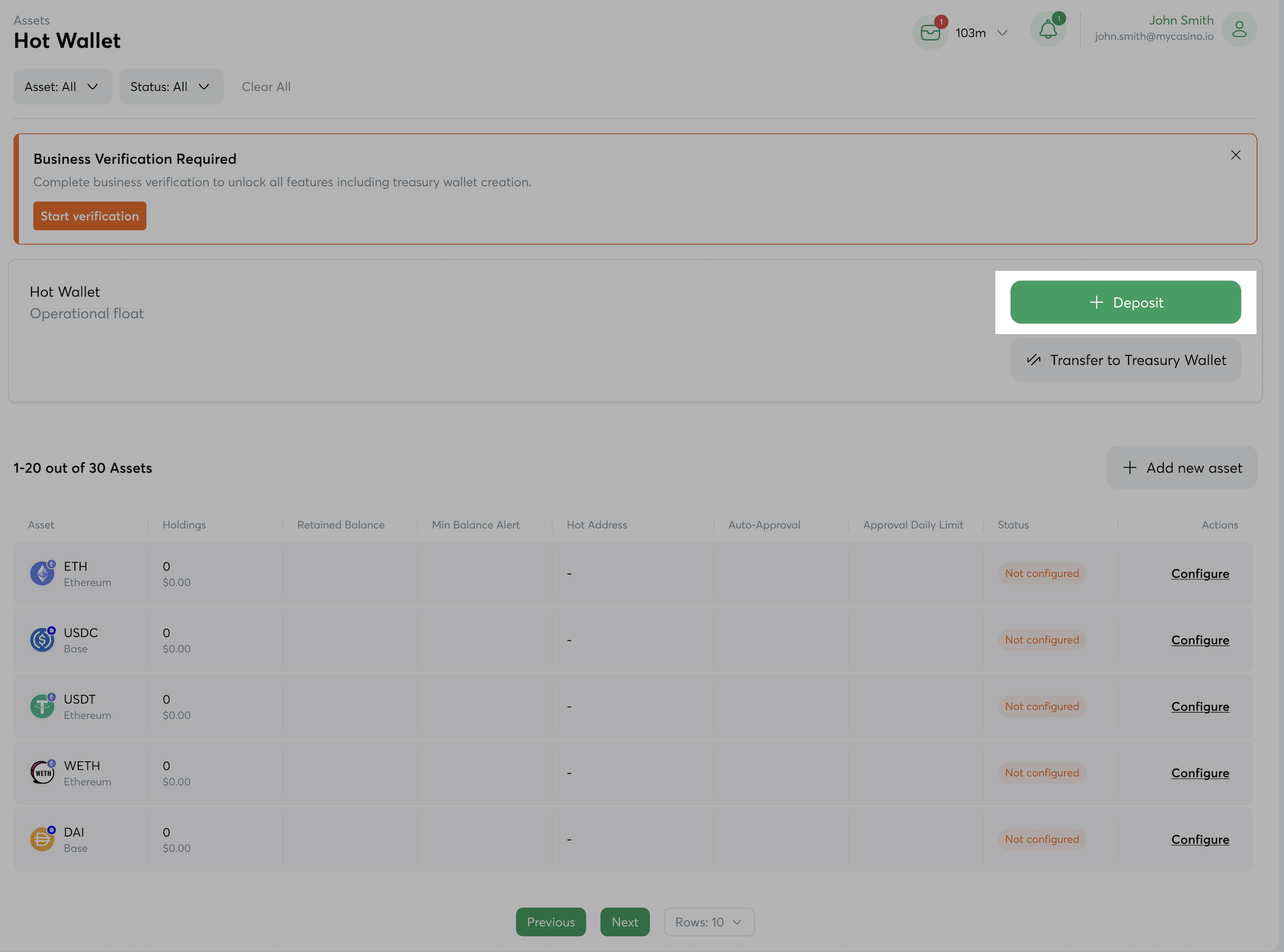
From the left-hand navigation, go to the **Hot Wallet** page. Here you will see an overview of all your configured assets and their current balances.
Click the **"Deposit"** button to begin.
{% endstep %}
{% step %}
### **Select Your Asset and Network**
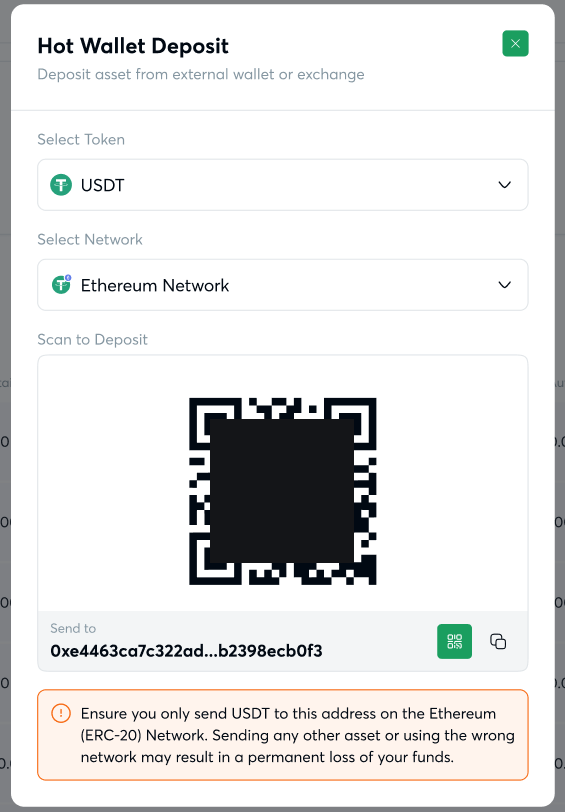
A modal window will appear. Use the dropdowns to select:
* **Asset** is the cryptocurrency or stablecoin you wish to deposit (e.g., USDT, BTC, ETH).
* **Network** is the blockchain network over which the funds will be sent (e.g., Tron, Ethereum, Polygon).
{% hint style="info" %}
Ensure that the deposit asset and network combination is available. See [Asset Networks](https://docs.pay.io/assets/asset-management-add-edit-disable/asset-networks) for all possible combinations and ensure the combination needed has been added to your assets.
{% endhint %}
{% endstep %}
{% step %}
### **Scan the QR Code or Copy the Wallet Address**
Once you have selected your asset and network, a unique QR code will be displayed alongside your Hot Wallet receiving address.
From your external wallet or exchange, either:
* **Scan the QR code** with your device to auto-populate the destination address, or
* **Copy the wallet address** manually and paste it into your sending platform.
{% hint style="warning" %}
**Before sending, verify the following:**
* The receiving address displayed beneath the QR code matches your Hot Wallet address exactly.
* The asset you are sending matches the asset selected in the previous step.
* The network you are sending on matches the network you selected.
Sending funds using the wrong asset or network may result in **permanent, unrecoverable loss of funds**.
{% endhint %}
{% endstep %}
{% step %}
### **Confirm the Deposit on Your Device**
Complete the transaction from your external wallet or exchange. Once the transfer has been broadcast to the blockchain and the required number of network confirmations have been reached, the funds will appear in your Hot Wallet balance automatically.
{% hint style="info" %}
**Confirmation times vary by network.**
If your funds do not appear immediately, allow a few minutes for the transaction to be confirmed on-chain. You can track the status using the transaction hash on the relevant block explorer.
{% endhint %}
{% endstep %}
{% endstepper %}
***
#### What's Next?
With a positive balance in your Hot Wallet, you are ready to start processing player transactions. We recommend reviewing the following:
* [Setting up Sweeps and Alerts](/assets/setting-up-sweeps-and-alerts.md) to automate the movement of excess funds to your Treasury Wallet for safekeeping.
* [User Withdrawal Limits](/assets/user-withdrawal-limits.md) to configure auto-approval rules to streamline the withdrawal flow for your players.
* [Float Set-Up and Maintenance](/assets/float-set-up-and-maintenance.md) to understand how to keep your Hot Wallet adequately funded over time.
---
# Agent Instructions
This documentation is published with GitBook. GitBook is the documentation platform designed so that both humans and AI agents can read, navigate, and reason over technical content effectively. Learn more at gitbook.com.
## Querying This Documentation
If you need additional information that is not directly available in this page, you can query the documentation dynamically by asking a question.
Perform an HTTP GET request on the current page URL with the `ask` query parameter, and the optional `goal` query parameter:
```
GET https://docs.pay.io/assets/making-a-deposit.md?ask=&goal=
```
`ask` is the immediate question: it should be specific, self-contained, and written in natural language.
`goal` is optional and describes the broader end goal you are ultimately trying to accomplish on behalf of the user. GitBook uses it to tailor the answer towards what is most useful for that goal.
The response will contain a direct answer to the question and relevant excerpts and sources from the documentation.
Use this mechanism when the answer is not explicitly present in the current page, you need clarification or additional context, or you want to retrieve related documentation sections.